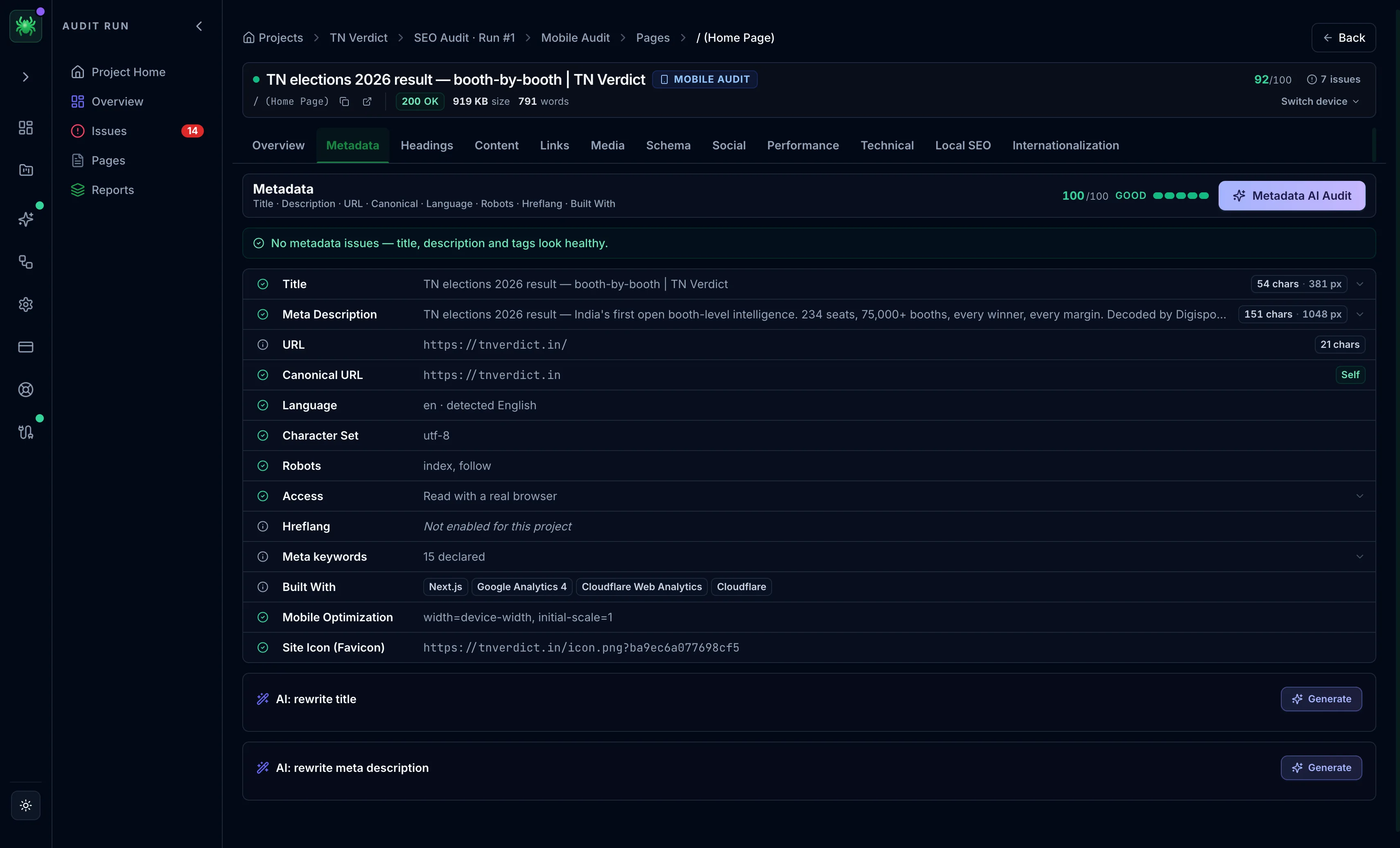
Metadata tab
The Metadata tab audits the title, description, canonical, robots directives, hreflang, and the technical tags behind how a page is indexed.
The Metadata tab covers the tags that decide how a page is indexed and displayed. That includes the title and description a searcher sees, plus the technical directives that control whether the page can appear at all. A single wrong tag here can suppress an otherwise strong page. It is usually the first tab to check when a page ranks below its content quality. The tab's score is the page's indexability score. Any issues in this category appear in a card above the field grid.
Redirect chain
When the crawled URL redirects, a redirect chain card lists every hop in
order, numbered top to bottom, with the status code of each and the final 200
destination. It is worth reading because each redirect adds latency. A chain can also leak link equity or, in the worst case, trap crawlers.
The card flags three problems explicitly:
- Permanent vs temporary — a chain built from
301/308hops is marked permanent; a302/307/303hop marks it temporary. A temporary redirect where a permanent one was intended passes less link equity to the destination. - HTTPS downgrade — an
HTTPS↓badge appears when any hop drops fromhttps://tohttp://, an insecure and SEO-damaging step. - Loop — flagged when the chain returns to a URL it already visited.
Field grid
Each tag is a row with a status dot and, where relevant, a length chip. Expand a row to see the raw value and a fix hint. Read it top to bottom. The first two rows carry the most weight because they are what a searcher actually sees.
Title and meta description
Both are scored on length. The chip shows the character count alongside the SERP pixel width where available, since pixels are how Google actually decides truncation. Length is treated as an opportunity, not a hard error. Too short under-uses the SERP space and costs click-through. Too long risks truncation.
| Tag | Optimal band | Status logic | Why it matters |
|---|---|---|---|
| Title | 30–60 characters | Pass 30–63 (5% tolerance), warn outside, fail if missing | The strongest on-page signal and the clickable headline in results. |
| Meta description | 120–160 characters | Pass 120–168 (5% tolerance), warn outside, fail if missing | Does not rank the page, but a sharp description lifts click-through; a weak one gets rewritten by Google. |
URL and canonical
- URL — shown with its character length; a URL quality row appears only when there is something to flag (tracking parameters, session IDs, or a fragment), with the parameter count.
- Canonical URL — marked Self (the healthy default), Different URL (correct for a duplicate, a problem if unintentional), External, or Missing. A wrong canonical is one of the most common causes of a page quietly dropping out of the index.
- Pagination — a
rel=prev/rel=nextrow appears only on pages that are part of a paginated set, flagging a broken sequence or a loop.
Language, robots, and access
- Language — the declared
langattribute against the language actually detected in the content, warning on a mismatch (for example,lang="en"on Japanese text). - Character set — flagged as a warning when missing rather than assumed to be UTF-8.
- Robots — the meta directive (
index/noindex,follow/nofollow) plusnoimageindex,noarchive, andnosnippetwhere set. A chip surfaces the X-Robots-Tag HTTP header, which can override the meta tag and is invisible in view-source. - Access — how the crawler actually read the page (browser vs HTTP fetch, whether it had to escalate past a bot wall), shown only when that provenance exists.
Hreflang and the rest
- Hreflang — a one-line summary of variant and error counts that links to the Internationalization tab for the full per-variant table. Shows "Not enabled for this project" when internationalization is off.
- Meta keywords and Resource hints (
preconnect,dns-prefetch,prefetch,modulepreload) appear only when present. - Built with — the detected technology stack (frameworks, CMS, analytics, CDN), also available in full on the Technical tab.
- Mobile optimization — the viewport meta, required for mobile-first indexing.
- Site icon (favicon) — the detected favicon URL, since the favicon shows next to the result on mobile.
An X-Robots-Tag noindex set as an HTTP header blocks a page even when its HTML
looks fine. It surfaces only in the Robots row's chip, not in view-source, so
check it before assuming a page is indexable.
AI actions
On paid tiers, the Metadata AI Audit pill in the header reviews the metadata and returns prioritized findings. At the bottom of the tab, once AI is unlocked, two write-actions — rewrite title and rewrite meta description — propose replacements you can apply. Both are seeded from the page's top content keywords.
Work this tab in order of leverage: clear any unintended noindex first, then
fix the canonical, then the title, then the description. The first three decide
whether the page ranks. The description decides whether people click.