
MCP Server
Connect Claude Code, Cursor, or Windsurf to Spider's crawl data — 64 project-scoped tools, 8 packaged SEO skills, and a hard single-project boundary.
Spider runs a built-in MCP server so AI coding assistants can query crawl data directly. They read audit results, issues, Google metrics, and site structure without anything being copied out by hand.
MCP is paid-only. Scout is denied outright rather than throttled. Tracker and Leader get unlimited calls. See Plans & tiers.
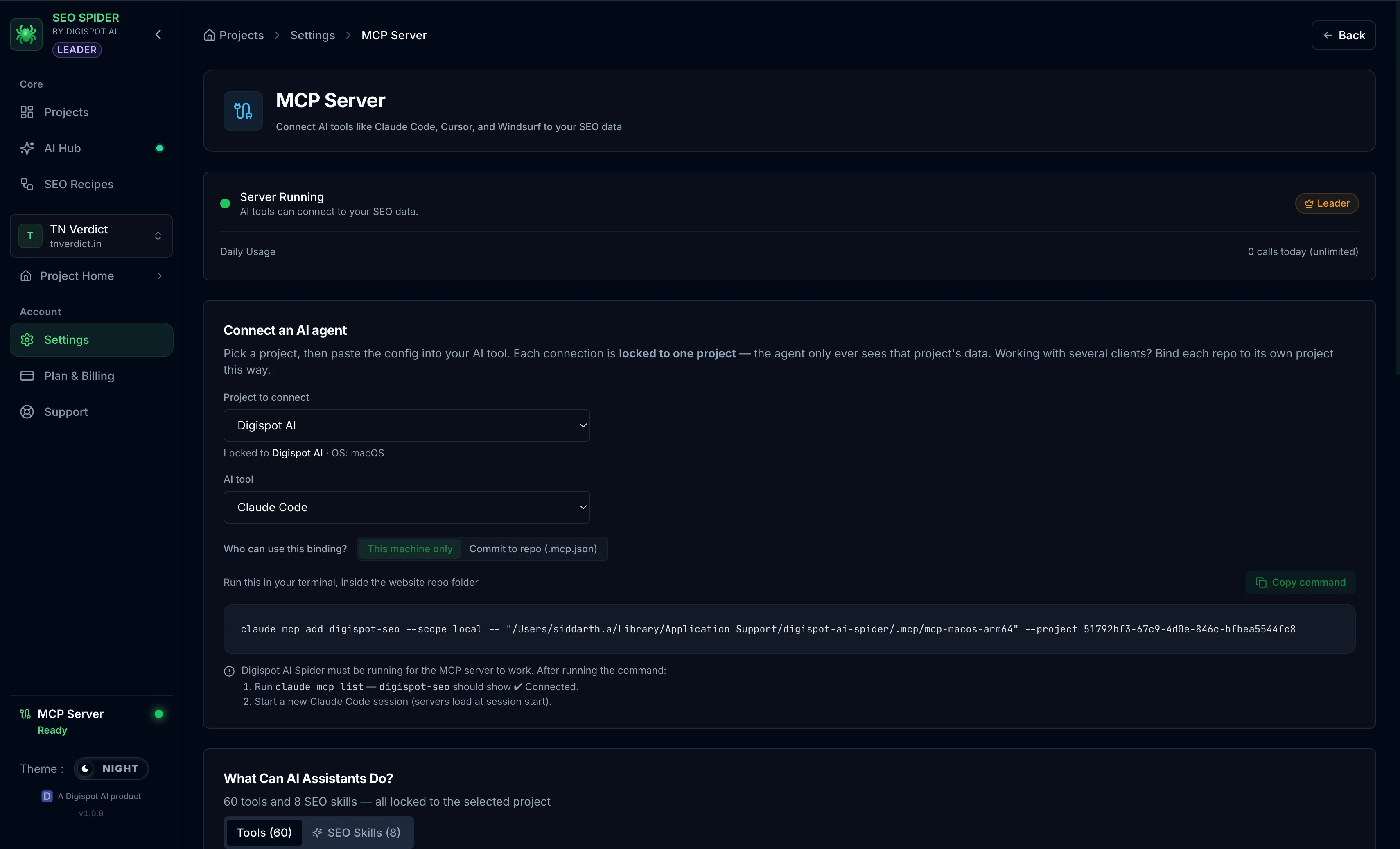
Project binding
Every server process is locked to exactly one project. The --project argument
is mandatory and the server refuses to start without it. There is no mode that
reaches every project.
The binding is enforced two ways:
- Injected, not accepted — the bound project id is inserted into every
project-scoped tool. Tools take no
projectIdparameter, so an agent has no field through which to name a different project. - Ownership-validated — any
crawlIdorpageIdan agent supplies is checked server-side first. A real id belonging to another project is refused.
Call get_mcp_scope at the start of a session to confirm which project the
server is attached to.
Connecting a client
Spider generates a ready-to-paste configuration per client. Open a project's Connect AI agent action, or Settings → MCP Server, to copy the exact snippet.
| Client | Where the config goes | Wrapper key |
|---|---|---|
| Claude Code | claude mcp add (no file to edit) | — |
| Cursor | ~/.cursor/mcp.json | mcpServers |
| Windsurf | ~/.codeium/windsurf/mcp_config.json | mcpServers |
| VS Code (Copilot) | .vscode/mcp.json in the repo | servers |
| Claude Desktop | ~/Library/Application Support/Claude/claude_desktop_config.json | mcpServers |
Claude Desktop has one global config and no per-project scope, so a binding there applies to every Claude Desktop conversation.
The desktop app must be running. The access check fails closed, so if the app is starting or busy the tools report that the connection could not be verified rather than silently returning empty results.
Packaged SEO skills
The server registers 8 skills as MCP prompts. Each drives the tools below in a set sequence, so an assistant runs a whole workflow from one instruction instead of calling tools individually and stitching results together.
| Skill | What it produces |
|---|---|
seo-audit | A graded baseline and a fix plan ranked by traffic-at-risk × severity × ease |
seo-quick-wins | The highest-impact, lowest-effort fixes to ship first |
seo-striking-distance | A rank-gain plan from near-page-one queries |
seo-competitor | A page compared head-to-head against a competitor's |
seo-content-strategy | Content gaps, topic clusters, and cannibalization |
seo-create-content | A draft grounded in the crawl and the Knowledge base |
seo-internal-linking | Orphans, weak anchors, and a source → target link plan |
seo-progress-report | Two crawls compared to prove fixes worked |
Tool reference
The server exposes 64 tools. They are read and safe-write only: the only
tools that change anything are the crawl controls, run_workflow, and the two
Knowledge proposals. No tool deletes a project or its data.
Projects and crawls
Entry points for finding a project and its crawl history.
list_projects— every SEO project in Spiderget_project— one project's detail and recent crawlslist_crawls— crawl history with status and scoresget_crawl_summary— site-wide scores, metrics, and Core Web Vitals spreadget_crawl_status_summary— page counts grouped by each status enumget_crawl_logs— crawl events, warnings, and discovered URLs for debugging
Crawl control
Start and steer a crawl. Stopping keeps everything already crawled.
start_crawl— begin an audit; devices come from the project configpause_crawl— pause and keep progressresume_crawl— continue a paused crawlstop_crawl— end a crawl, retaining crawled datawait_for_crawl— block until a crawl finishes, then return final statuslist_active_crawls— check before starting another crawl
Pages
Page-level detail, from a whole report down to a single tab.
list_pages— crawled pages with scores, search, sorting, paginationget_page_report— the full report for one pageget_page_section— one section (metadata, headings, links, schema…)get_page_category_detail— the per-tab payload as the app renders itget_page_screenshot— the URL of a page's rendered screenshotget_site_graph— structure, depth, orphans, indexability
Issues
Aggregated findings, plus the catalog behind them.
list_issues— issues across the site, filterable by category and severityget_critical_issues— critical and high-severity findings firstget_issue_pages— every page affected by one issue typeget_page_issues— every issue on one page, with fixesget_quick_wins— high-impact, low-effort improvements by ROIget_broken_links— broken links with error types and source pagesget_redirects— redirects by type, including chainsget_duplicates— duplicate titles, descriptions, H1s, or contentget_issue_definition— one issue's severity, impact, and recommended fixlist_issue_definitions— the full catalog, independent of any crawl
Site-level checks
Whole-site signals rather than per-page ones.
get_site_analysis— robots.txt, sitemap.xml, SSL/TLS, llms.txt complianceget_robots_blocked_urls— the actual blocked URLs and top blocked pathsget_sitemap_coverage— orphans, and in-sitemap-but-not-crawled URLsget_project_health— an A+–F grade blending scores, issue load, and trend
Google data
Live OAuth connections and imported Search Console data.
get_google_metrics— per-URL GSC or GA4 performanceget_gsc_import_top_pages— top pages by clicks or impressionsget_gsc_import_top_queries— top queries, site-levelget_gsc_sitemaps— Google's own view of submitted sitemap healthget_url_inspection— live URL Inspection: indexed state and coveragelist_gsc_imports— Page-Indexing CSV imports and exclusion reasonsget_ga4_sections— GA4 KPIs and section breakdowns in one callget_google_search_incidents— Search Status Dashboard incidents
Prioritization
Where traffic data turns a list of issues into an order of work.
get_issues_with_traffic— issues ranked by traffic at riskget_high_traffic_at_risk— high-traffic pages that also have issuesget_google_opportunities— four-layer audit, GSC, GA4 correlationget_link_insights— which pages should link to under-linked pagesget_content_opportunities— new pages worth writing, with outlinesget_backlinks— backlink profile and referring domainsget_keywords— the keyword universe mapped onto site topics
Trends and comparison
Change over time, and across devices.
get_project_trends— score trends across crawlscompare_audits— two crawls side by sideget_audit_deltas— new versus fixed issues since the last auditget_device_comparison— metrics across desktop, mobile, and tabletget_device_url_gaps— per-URL score gaps between devices
Workflows
Spider's recipes, run from the agent. Generated images need the download tool.
list_workflows— available workflows and their input specsrun_workflow— run one by id; returns arunIdget_workflow_run— poll for status and resultslist_image_references— Image Studio reference images and their idsdownload_workflow_image— save a generated image locally
Workflow image URLs carry an auth secret only the server holds. An agent must
use download_workflow_image rather than fetching the URL directly.
Knowledge base
Owner-authored business facts that ground every AI feature. Writes are review-first by design.
get_knowledge— documents, or the exact context block AI calls receivepropose_knowledge— propose one document; it lands as an inactive draftactivate_knowledge— activate a draft the user confirmed verbatim in chatadd_competitor— track and profile a competitor from their sitemaps
activate_knowledge is off by default and enabled per project under Knowledge
→ "Allow AI to activate knowledge". It refuses unless the body passed matches
the stored draft exactly, so an agent cannot activate text the owner has not
seen.
Connection
Diagnostics. get_mcp_status and get_mcp_scope are free and never count
against usage.
get_mcp_status— connection status and usageget_mcp_scope— the project this server is locked toget_mcp_diagnostics— detailed environment and connection diagnostics