Media tab
The Media tab audits images and video — alt text, formats, dimensions, CDN delivery, and VideoObject schema.
The Media tab covers both images and video on the page and flags the media that can be optimized for speed and search. Images are usually the single largest slice of page weight and a common cause of layout shift. Missing alt text costs both accessibility and image-search visibility. This tab connects directly to the Performance and Content findings.
Images
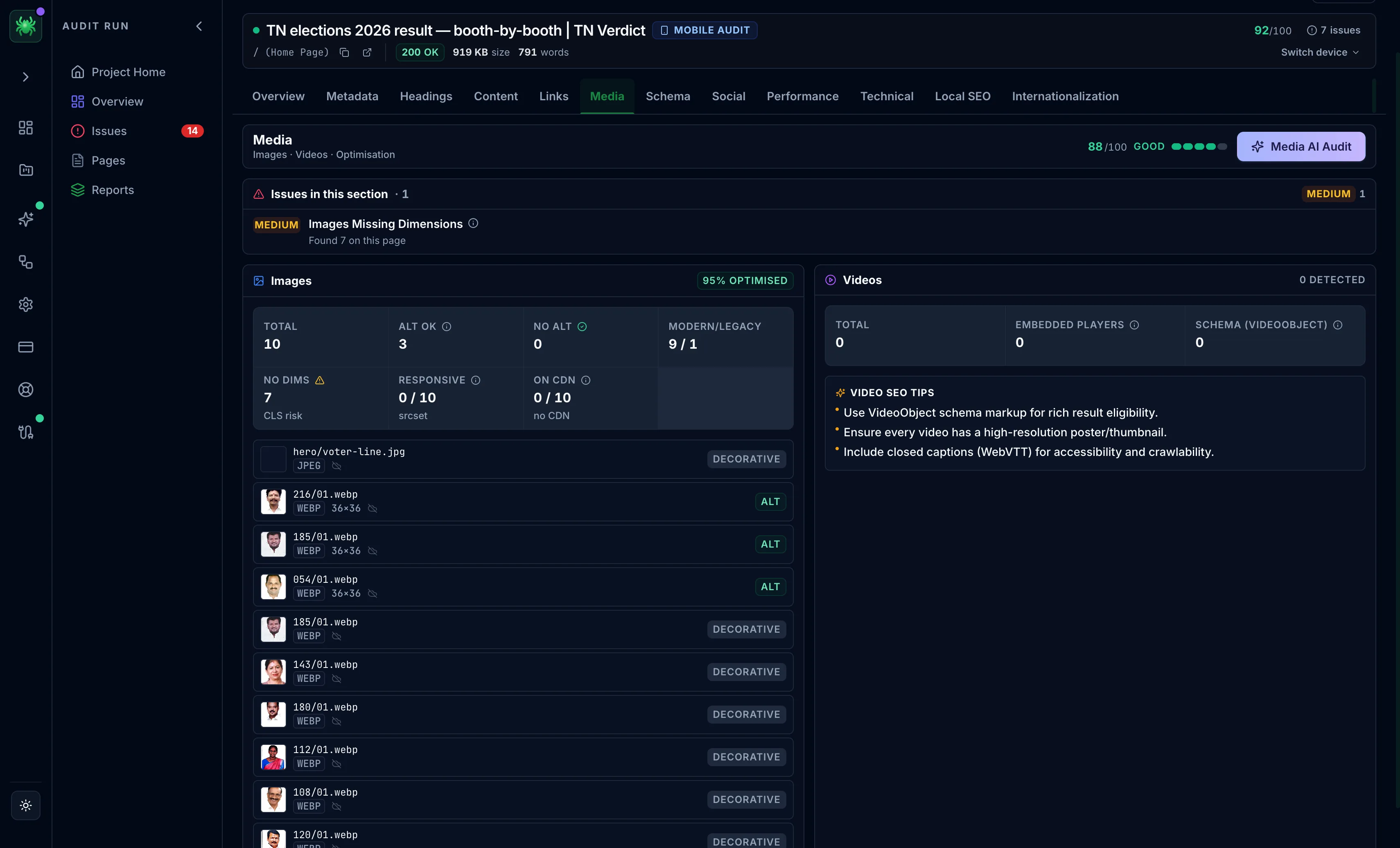
An optimisation list surfaces images that could be smaller, judged on format, dimensions, and bytes-per-pixel. An images card reports:
- Total, alt OK, and no alt counts, with a three-state alt chip per
image — No alt (a problem on meaningful images), Decorative (an
intentional empty
alt, which is correct), or Alt (present) - Modern vs legacy format — how many images use next-gen formats (WebP, AVIF) versus older JPEG/PNG
- No dimensions — images without width and height, a Cumulative Layout Shift risk because the browser cannot reserve space before they load
- Responsive (
srcset) and on CDN, with the detected CDN provider - A paginated image list with thumbnails, path, format, and dimensions
Videos
The videos card reports the total videos, embedded players, and whether VideoObject schema is present, along with detected platforms and poster coverage. It also gives guidance on schema, poster images, and captions.
On paid tiers, the Media AI Audit reviews the media and prioritizes fixes.
A Decorative alt state is not a failure. An empty alt="" on a purely
decorative image is the correct choice, because it tells screen readers to skip it.
Only meaningful images flagged No alt need attention.
Fixing images that report no dimensions and serving next-gen formats usually improves both the CLS and LCP metrics on the Performance tab. Treat this tab and Performance as one workflow.