Videos
The Videos panel detects embedded and hosted video, validates VideoObject schema, and separates real content from decorative background video.
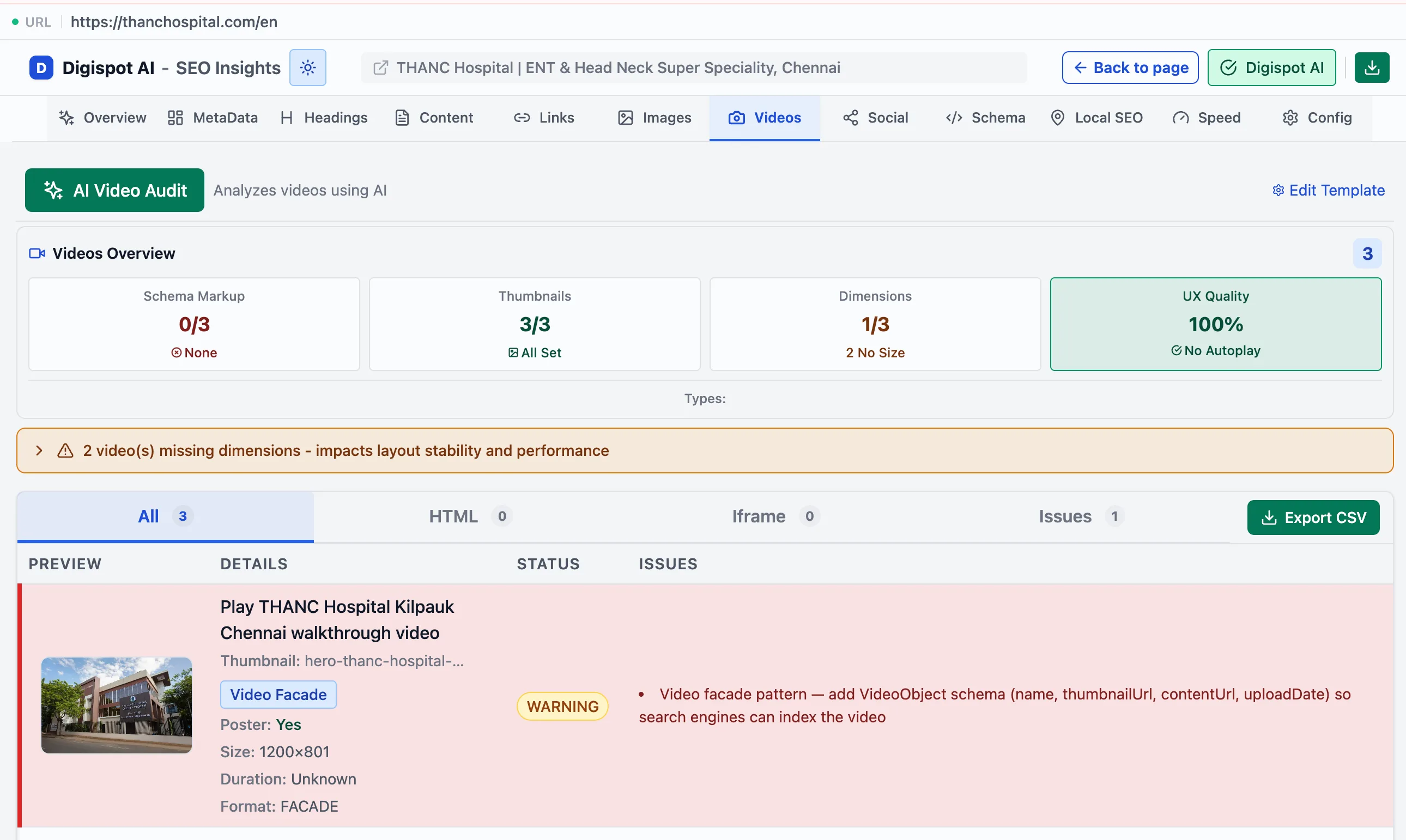
The Videos panel finds every video on the page, both embedded players and hosted files. It then checks whether each is set up to earn video rich results. A video with valid VideoObject markup can win a thumbnail in search and appear in the Google video tab. Without it, the same video is invisible to search. This panel shows which videos are eligible and what's missing on the ones that aren't.
Overview
The panel opens with a Videos Overview: scorecards that summarize how the page's videos are set up before you drill into individual ones.
- Schema markup: how many videos carry valid VideoObject markup
- Thumbnails: how many declare a poster image
- Dimensions: how many declare an explicit width and height
- UX quality: playback behavior such as autoplay-with-sound, scored as an overall signal
Filtering and export
Filter tabs, each with a count, narrow the list. Export CSV includes the platform, background flag, dimensions, duration, format, poster, and playback attributes.
- All — every video on the page
- HTML — native HTML5
<video>elements - Iframe — embedded players (YouTube, Vimeo, and others)
- Issues — only videos with a detected problem
Per-video detail
Each video card shows how it is embedded and configured.
- Source type — HTML5 video or an iframe embed
- Platform — YouTube, Vimeo, Wistia, and others, plus self-hosted
- Poster, duration, and playback attributes (autoplay, muted, loop). An autoplay video without muted is flagged as poor UX, since browsers block it and users find it jarring
- VideoObject schema validity for rich-result eligibility. This is the check that decides whether the video can appear as a rich result at all
- The specific issues found
Decorative background videos are marked with a Background Video badge and excluded from issue counts, so a hero-video loop doesn't generate false warnings.