
Audit categories
The on-page auditor groups 150+ checks into categories — one panel per area of SEO. This section documents each category, plus the cross-cutting checks.
When you audit a page, the 150+ checks are grouped into categories, one panel per area of SEO. Open a category to see its checks, filters, and export options. Every panel also has a one-click AI Audit that turns its raw results into prioritized recommendations.
The AI Audit button is optional, and every check runs without it. The button reads Unlock AI Audit until you connect an AI model. After that, it becomes the category-specific action (for example AI Schema Audit).
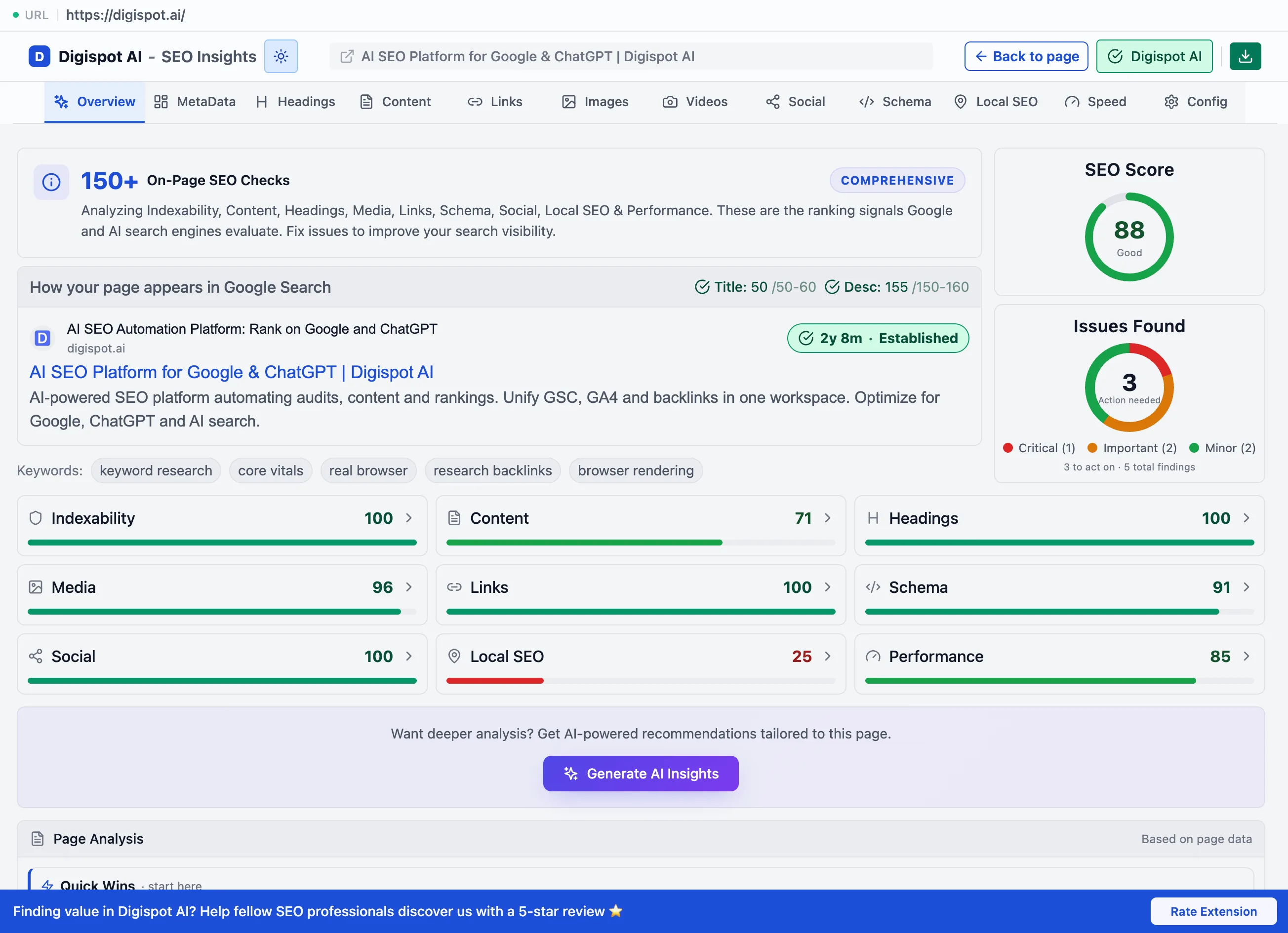
Each category in detail
Metadata
The Metadata panel audits the title, description, and technical tags that decide how a page is indexed and shown in search results.
Content
The Content panel measures the depth, readability, and topical relevance of a page's writing across three sub-tabs.
Keywords
The keyword analysis surfaces the terms a page ranks for — density across one-, two-, and three-word phrases, related entities, and authority correlation.
Headings
The Headings panel validates the H1–H6 outline and can rewrite headings with AI, applying accepted changes live on the page.
Links
The Links panel breaks down internal, external, and other links with anchor text, rel attributes, and CSV export.
Images
The Images panel audits alt text, formats, file size, and lazy loading, with filters for the images that need attention.
Videos
The Videos panel detects embedded and hosted video, validates VideoObject schema, and separates real content from decorative background video.
Social
The Social panel validates Open Graph and Twitter Card tags and renders a live preview of how the page looks when shared.
Schema
The Schema panel detects structured data, validates it against Google's requirements, and visualizes it as an interactive graph.
Local SEO
The Local SEO panel checks NAP consistency, LocalBusiness schema, and location signals — and only applies its advice to genuinely local pages.
PageSpeed
The PageSpeed panel reports Core Web Vitals from three sources — live in-browser, lab, and real-user field data — plus resource hints.
Cross-cutting checks
These are audited too. They surface within the categories above rather than as panels of their own.
Indexability & discoverability
Whether search engines can reach and index the page at all:
- robots.txt validation — blocked pages, disallowed paths, syntax errors
- sitemap.xml detection — presence and accessibility
- Meta robots tags —
noindex,nofollow,noarchive - Canonical URLs — ensures Google indexes the right version
- X-Robots-Tag HTTP headers — server-level directives
- User-agent blocking — detects if Googlebot or other crawlers are blocked
- Crawl accessibility — JavaScript-dependent content that may not be crawled
Indexability problems outrank everything else in severity. A page that cannot be indexed cannot rank, however good the rest of its SEO is.
Mobile SEO
- Viewport meta tags
- Mobile-friendly fonts and touch-target sizes
- Core Web Vitals on mobile
- Responsive image optimization
- Mobile usability issues affecting Google's mobile-first index
AEO — answer engine optimization
AEO is optimization for AI platforms such as ChatGPT, Perplexity, Claude, and Gemini. The extension checks:
- Structured content formatting
- Clear question-and-answer patterns
- Entity recognition
- Topical authority signals
- Content scannability
Install the Extension
Install Digispot AI — SEO Insights from the Chrome Web Store and run your first on-page audit or SERP analysis in under a minute — no account, no card.
Metadata
The Metadata panel audits the title, description, and technical tags that decide how a page is indexed and shown in search results.