Images
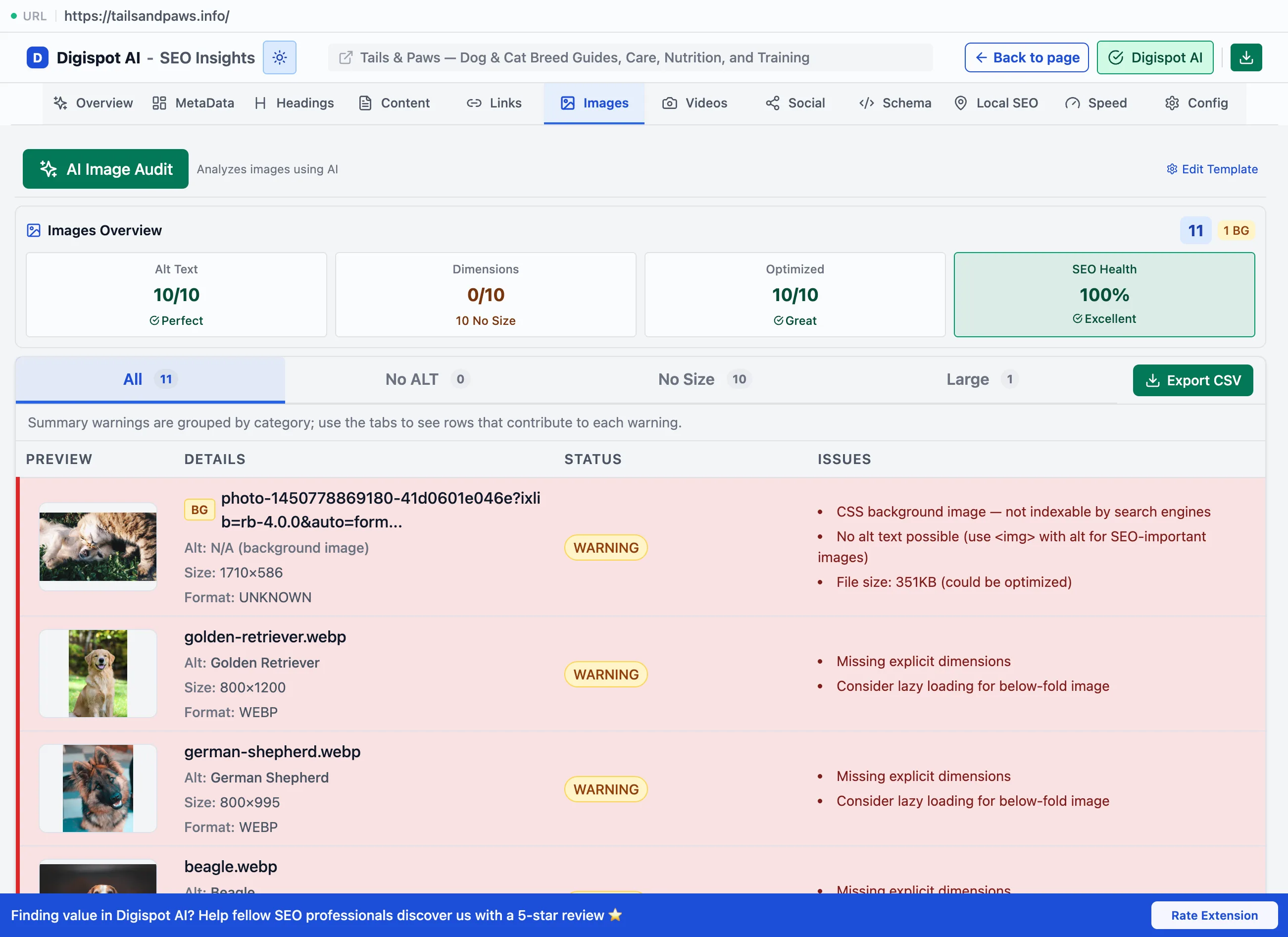
The Images panel audits alt text, formats, file size, and lazy loading, with filters for the images that need attention.
The Images panel lists every image on the page and flags the issues that hurt accessibility, search, and load speed. Images are usually the largest bytes on a page, so they drive load time and Largest Contentful Paint. Their alt text is both an accessibility requirement and the main way image search understands them. This panel finds the images working against all three.
Overview
The panel opens with an Images Overview: scorecards that summarize the page's image health before you drill into individual files.
- Alt text: how many images carry alt text
- Dimensions: how many declare explicit width and height, since missing ones cause layout shift
- Optimized: how many use a modern, appropriately compressed format
- SEO Health: an overall score that rolls the cards above together
The total page weight contributed by images is reported here too, so the size cost and its effect on LCP is visible at a glance.
Filtering and export
Filter tabs, each with a count, narrow the list. Export CSV includes the URL, alt, type, element tag, width, height, file size, format, status, and lazy-loaded flag for a full audit trail.
- All: every image on the page
- No ALT: images missing alt text
- No size: images with no explicit width or height (a cause of layout shift)
- Large: oversized files for their dimensions
Per-image detail
Each image card shows a thumbnail and the checks that matter.
- Alt text, with a Missing! flag when absent. Alt text is required for accessibility and is how image search reads the image. Decorative images should carry empty alt, and content images descriptive alt
- Size and Format. WebP and AVIF compress far smaller than JPEG or PNG at the same quality, so the panel recommends them over older formats
- A green Lazy badge when lazy loading is used, which defers off-screen images so they don't block the initial load
- An overall Error / Warning / OK status and the specific issues
File size is judged by bytes per pixel. A large image is only flagged when it's heavy for its dimensions, rather than by absolute size. Modern formats are held to a stricter bar than legacy ones.
| Format | OK | Warning | Error |
|---|---|---|---|
| WebP / AVIF | under 0.8 bytes/px | 0.8–1.5 | over 1.5 |
| JPEG / legacy | under 1.0 bytes/px | 1.0–2.0 | over 2.0 |
Fix the largest images above the LCP fold first. Converting a hero image to WebP or AVIF and setting explicit width and height often improves both LCP and CLS in one change.