
SERP Intelligence
Decode any Google search results page — who ranks, which sources AI Overviews cite, and what content gaps you can exploit.
Open a Google search results page and the extension switches automatically. It moves from auditing a single page to decoding the entire result set: every organic result, ad, local listing, and AI Overview citation on the page.
Automatic activation
SERP mode turns on by itself the moment you land on a Google search results page. There is nothing to toggle. It works across 17 Google country domains:
| google.com | google.co.uk | google.ca | google.com.au |
| google.co.in | google.de | google.fr | google.es |
| google.it | google.com.br | google.co.jp | google.co.kr |
| google.nl | google.pl | google.ru | google.se |
| google.ch |
On any other page, including non-Google search engines, the extension stays in on-page audit mode. See On-Page Panels.
What it extracts
SERP mode parses the whole page in a single pass, deduplicates results, and classifies each one:
- Organic results: who ranks, with rich snippets, sitelinks, and breadcrumbs
- AI Overview citations: which sources Google's AI Overview references
- Ads: text and shopping ads
- Local pack: map listings, ratings, hours, and phone numbers
- Featured snippets and knowledge panels
- People Also Ask
- Video carousels and top stories
- Discussions: forums such as Reddit and Quora
- Shopping carousels
- Related searches
Overlay badges
SERP mode draws numbered badges directly onto the live search page so you can see the result composition at a glance. Badges are color-coded and numbered by type. Organic results, AI citations, local pack, ads, video, discussions, and shopping each get their own sequence. They persist as you scroll and survive Google's lazy-loading.
Use the overlay toggle to turn the on-page badges on or off at any time.
Statistics
A statistics view summarizes the makeup of the result page in real time. It counts organic results, AI Overview citations (with unique URLs and domains), ads, local pack, video, shopping, and featured snippets. This lets you read the competitive shape of a query immediately.
Results table
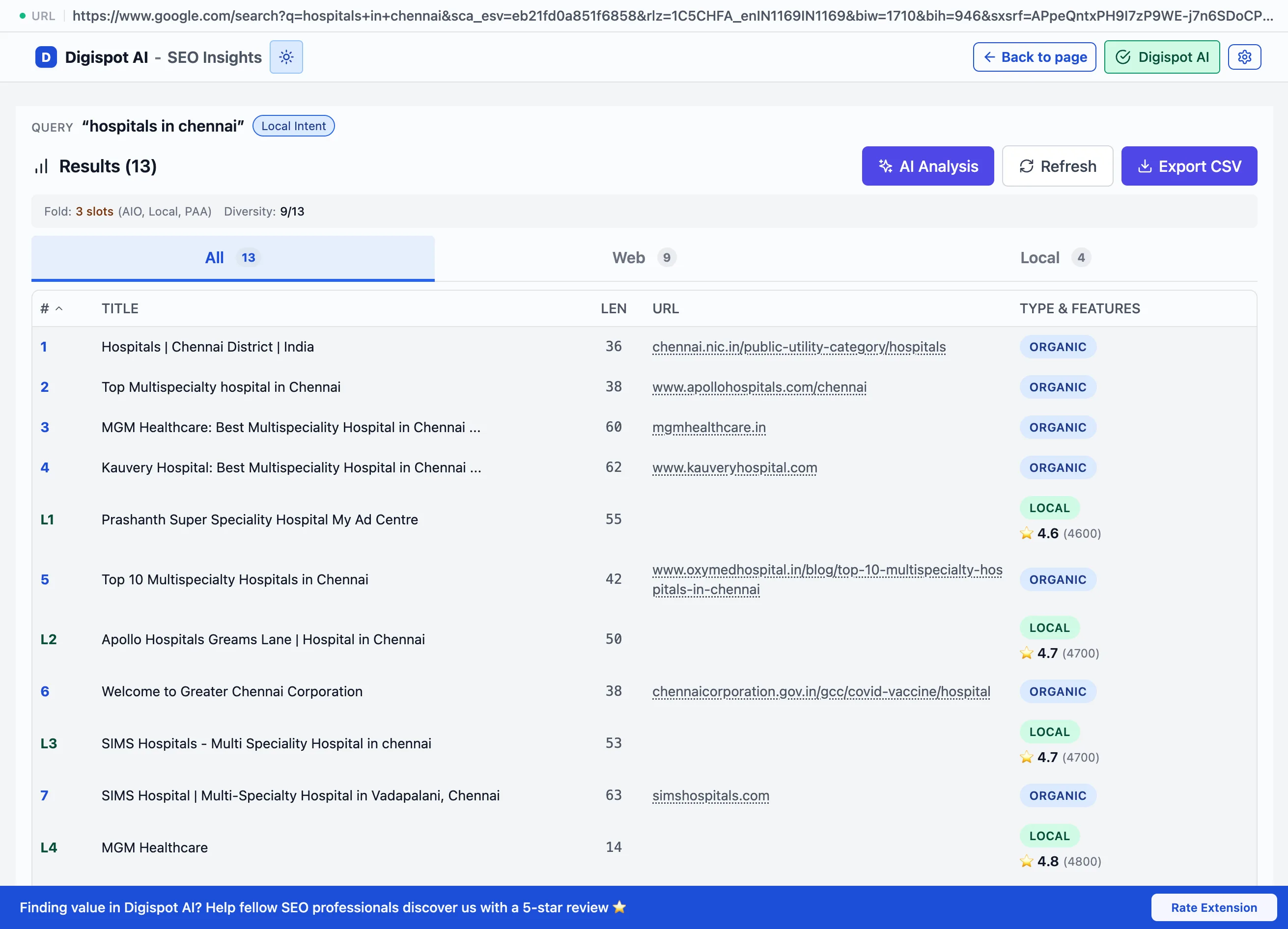
Every result is also listed in a sortable, searchable table with position,
title, URL, type, and SERP features. Rows are numbered to match the on-page
badges, for example V for video, D for discussion, S for shopping, and
AI for AI-cited results. AI-cited results are flagged.
Export to CSV
Export the full result set to a CSV file. The file is UTF-8, Excel-compatible,
and named after the query and date (for example
serp-best-running-shoes-2026-08-11.csv). The export includes every classified
result and its type, with duplicates filtered.
Asking the AI
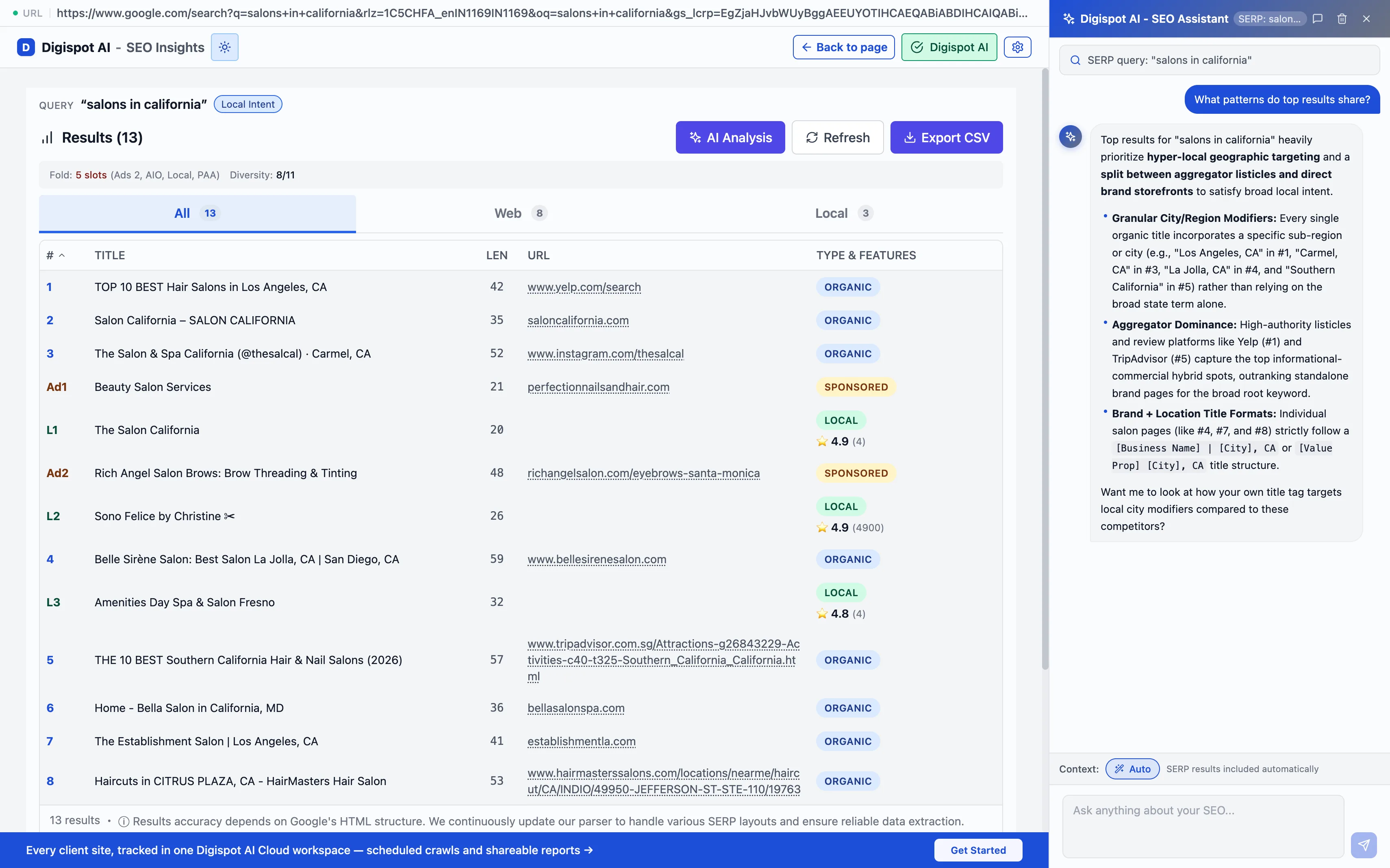
With an AI model connected, AI Chat analyzes the whole SERP landscape rather than a single page. Useful questions:
- "What content gaps can I exploit?"
- "Why are these pages ranking and mine isn't?"
- "What schema markup are top results using?"
It surfaces opportunities the top-ranking pages miss and explains how to build content that fills them. One search query becomes a competitive strategy.
Optimizing for AI search (AEO / GEO)
AI search engines increasingly decide what users see: ChatGPT, Perplexity, Google Gemini, and Claude. The goal shifts from ranking in blue links to being the source those engines cite.
AI Chat helps in both modes:
Evaluates your page's readiness to be cited:
- Entity clarity
- Question-and-answer formatting
- Topical authority signals
- Structured data completeness
Try: "Is my content structured for AI citations?" or "How can I improve my chances of being referenced by ChatGPT?"
Pair the two: run SERP mode to see which competitors get cited, then run On-Page mode on your own page to find what it is missing by comparison.
PageSpeed
The PageSpeed panel reports Core Web Vitals from three sources — live in-browser, lab, and real-user field data — plus resource hints.
Viewing Modes & Overlays
Popup, Visualize, and Fullscreen modes — plus visual on-page overlays that mark headings, images, videos, and links directly on the page.