
Workflows
Practical ways to use the extension — competitor analysis, pre-publish checks, client audits, and exporting reports.
The extension works on any public website, which makes it as useful for pages you do not control as for your own.
Competitor analysis
Navigate to a competitor's page and select the extension icon. You see their full on-page strategy: schema markup, Core Web Vitals, content structure, heading hierarchy, meta tags, and internal linking patterns.
Export each report to compare competitors side by side and work out why they outrank you.
In SERP Intelligence mode, run the audit on the search results page first. This shows who ranks and which results earn AI Overview citations. Then audit the individual pages that win.
Pre-publish checks
Run the audit on staging before publishing. It catches missing meta tags, broken schema, slow Core Web Vitals, intent mismatches, and heading structure problems while they are still cheap to fix.
Fixing these before launch avoids the far slower cycle of publishing, watching rankings suffer, diagnosing, and re-earning the position.
Client and agency work
- Run quick audits during discovery or a pitch
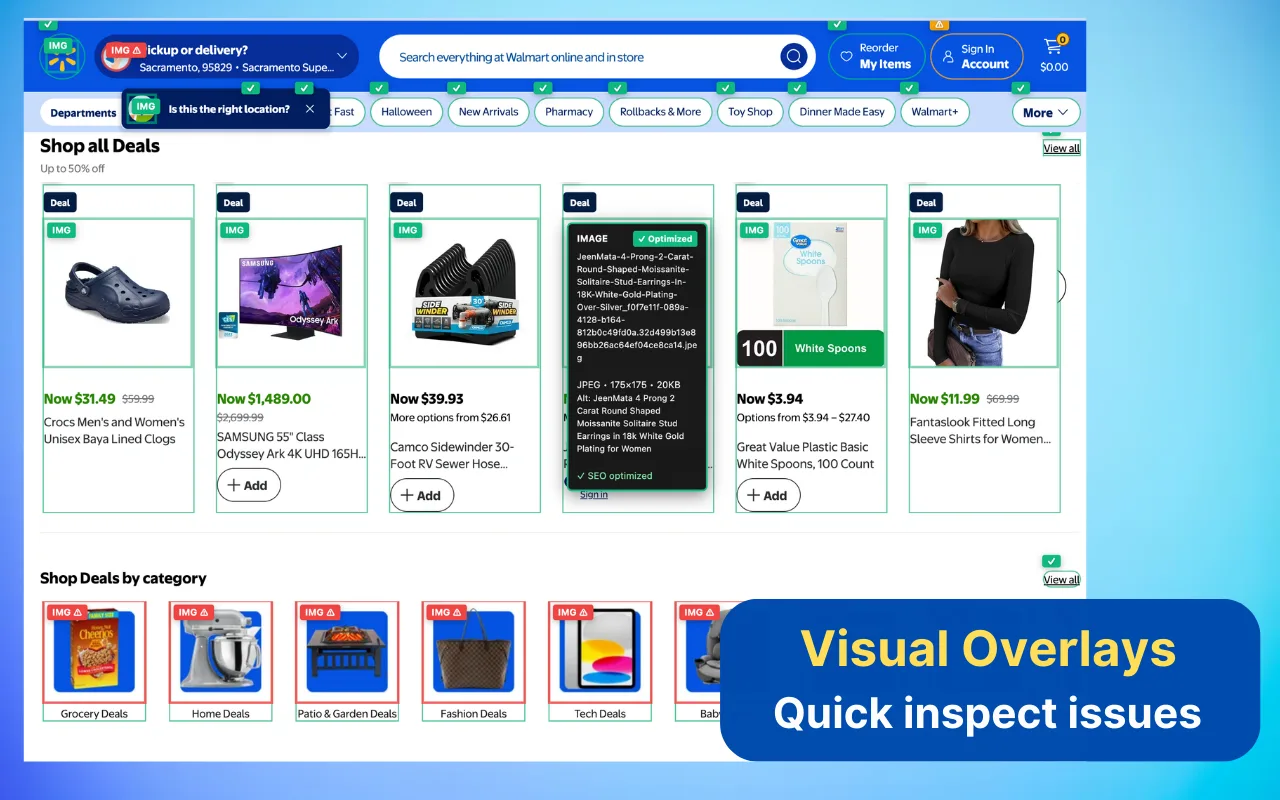
- Use Visualize Mode on a call to overlay issues directly on the client's page. It is far more persuasive than a spreadsheet
- Export reports to share findings with clients, developers, or stakeholders
Exporting
Reports export in TXT format. This gives you a human-readable summary suited to sharing with clients, developers, or stakeholders.
You can also screenshot Visualize Mode to document issues visually, directly on the page.
Other workflow features
| Feature | What it does |
|---|---|
| Multi-tab batch audits | Audit several open tabs in one pass |
| Right-click context menu | Start an audit without opening the popup |
| Local caching | Repeat audits on the same page return faster |
| Competitor intelligence | Compare schema and structure against rivals |
When to move up to SEO Spider
Most people are well served by the free extension for spot checks and occasional audits. Digispot AI SEO Spider is worth considering if you find yourself:
- Auditing 50+ pages weekly
- Manually comparing mobile versus desktop
- Exporting reports for multiple clients regularly
- Needing systematic content gap discovery
| Chrome Extension | SEO Spider | |
|---|---|---|
| Scope | One page at a time | Whole site — 10,000+ pages |
| Checks | 150+ per page | 300+ per page |
| Device modes | Your current viewport | Mobile, tablet, and desktop per crawl |
| Prioritisation | Severity only | Weighted by GSC and GA4 traffic at risk |
| Automation | Manual, per page | Scheduled crawls and workflows |
| Price | Free forever | Paid, with a free tier |
Working solo? SEO Spider runs unlimited crawls locally on Mac or Windows. Working as a team? The Cloud Platform adds shared projects and GSC and GA4 integration. Its audits run on Digispot's servers rather than your laptop.
Managed AI (Extension Key)
Connect a free Digispot account with an Extension Key to run AI through Digispot instead of your own key, and unlock server-side field data, PageSpeed, and domain age.
Privacy & Data
How the extension handles your data — audits run locally, no signup, no tracking, and API keys are stored encrypted on your device.