
Audits & reports
Configure crawls, run them at scale on Digispot's servers, and read the results across report categories — one screen per area of SEO.
In the cloud, audits run on Digispot's servers rather than your machine. Long crawls don't tie up a laptop, and your whole team sees the same results.
Audit configurations
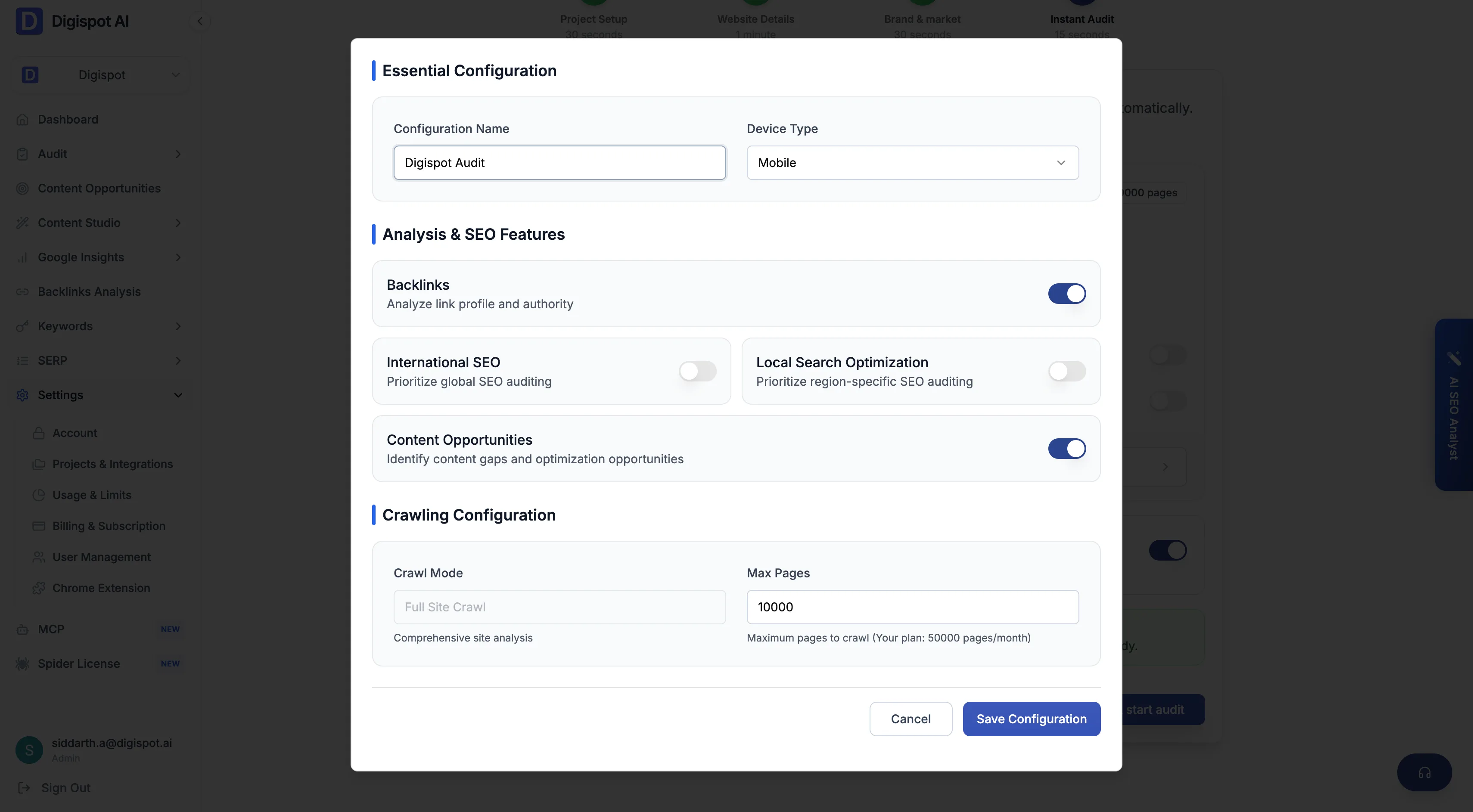
An audit configuration is a reusable crawl setup for a project. You control:
- Configuration name and device type
- Crawl mode and page crawl limit
- Sitemap limit and exclude paths
- Optional modules — Backlinks, Local SEO, Internationalization, and Content opportunities
Audit runs
Start a run from a configuration. Runs are listed with a status — Queued, Running, Completed, or Failed — alongside their run steps. When a run completes, its results open as a graded dashboard with category score cards and a severity-ranked issue list.
Report categories
Once a run completes, the results are split into report screens, one per area of SEO. Each has a list view. Most have a per-page detail view, and each offers an AI "Summarize with AI" insight.
Issues report
The Issues report aggregates every finding across the audit, grouped by severity and prioritized into quick wins, easy fixes, and critical work.
Site report
The Site report covers site-wide signals — health score, robots.txt, sitemaps, security, and llms.txt.
Pages report
The Pages report lists every crawled URL with per-dimension scores, and drills into a full per-page breakdown.
Crawlability report
The Crawlability report checks canonical URLs, meta robots, and whether AI crawlers see the same page Googlebot does.
Content report
The Content report scores content quality and E-E-A-T, with keyword, schema, and URL analysis.
Performance report
The Performance report covers Core Web Vitals, speed metrics, and network diagnostics, with fastest- and slowest-page leaderboards.
Links report
The Links report scores link health, breaks down internal, external, and social links, and flags broken and redirected links.
Tech stack report
The Tech report scores technical infrastructure and lists the technologies detected across the site.
Media report
The Media report scores image and video SEO across the site.
Brand report
The Brand report scores how consistently a site presents its brand across titles, descriptions, schema, and icons.
Local SEO report
The Local SEO report scores local signals — business schema, local keywords, phone, embedded map, and store locator.
International SEO report
The International SEO report scores hreflang setup and language and region coverage across the site.
Report screens unlock once an audit run has completed. Some also require their module to be enabled in the audit configuration: Local SEO, International SEO, and Backlinks.