
Teams & Roles
Organizations, role-based access (Specialist, Admin), inviting members, and switching between organizations.
The Cloud Platform is multi-tenant. Everyone works inside a shared organization. What each person can do is governed by their role.
Roles
There are two roles:
| Role | Can do |
|---|---|
| Specialist | Create and manage projects and audits. Can view user management, with limited editing. |
| Admin | Full access, including user management and billing. |
Some areas are Admin-only: user management, billing, and the API-key screens (MCP, Chrome extension). Specialists can view user management but not make changes there.
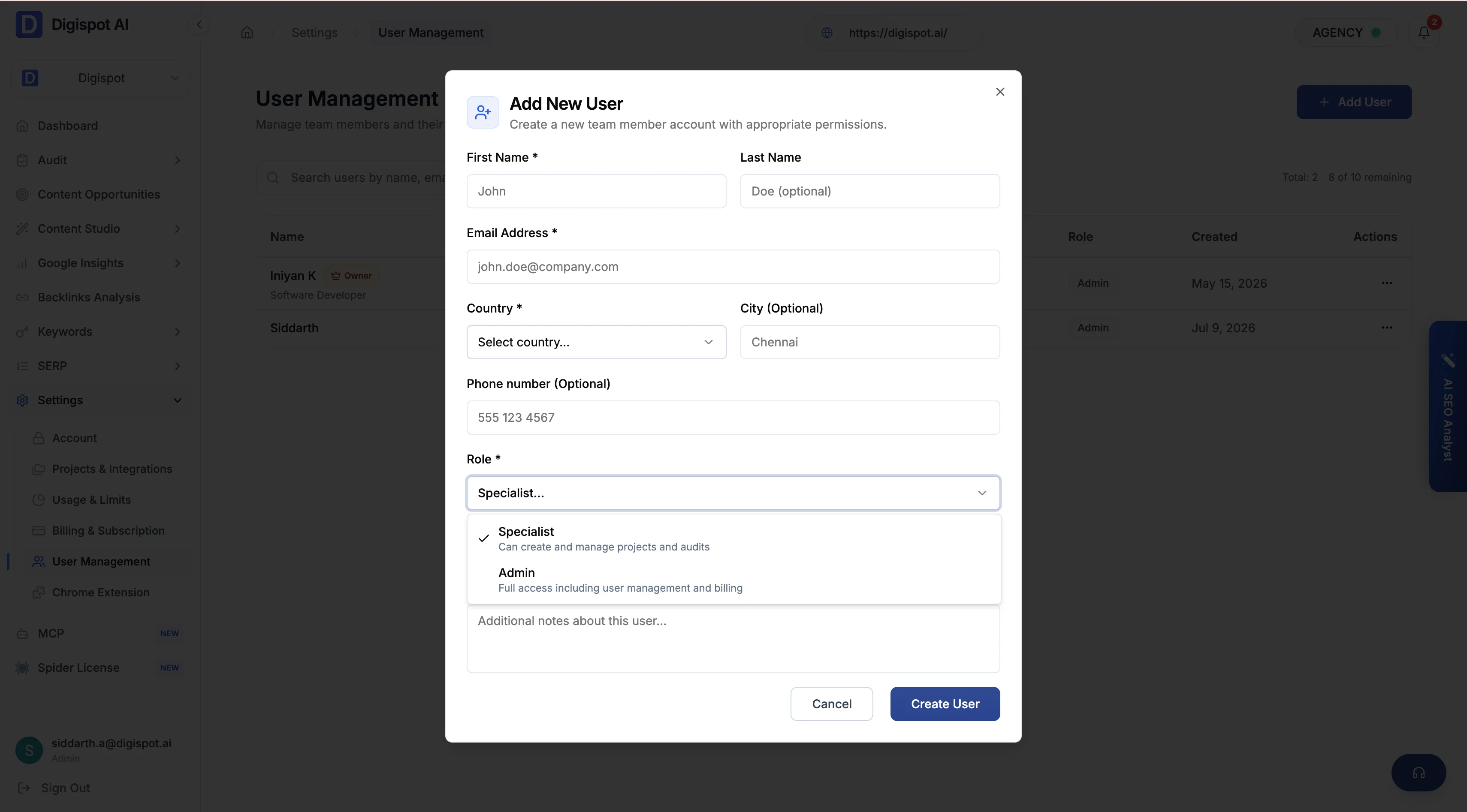
Inviting members
Admins invite teammates by email from User Management. An invited user is pending until they accept the emailed invite and set a password (or link Google). You can resend or revoke a pending invite. You can also edit a member's role or active status later.
A few guardrails apply. The organization owner can't be deleted. Only Admins can grant the Admin role or toggle a member's active status. You can't change your own role or status.
Multiple organizations
You might belong to more than one organization, for example as a consultant across several clients. You can switch the active organization in-session with the organization switcher, without logging out.
Getting Started
Sign up, create your organization, walk through the project wizard, and run your first cloud audit — plus where to install the free Chrome extension and SEO Spider.
Dashboard
The dashboard is the platform's home — a site-wide view of health, search performance, traffic, and the actions worth taking next.