
Keyword research
Look up search volume, difficulty, intent, and CPC for any term, expand into related keywords on a relationship graph, pull a competitor domain's rankings, and keep results in a reusable library.
Keyword research pulls live search data for a term, expands it into related keywords, and keeps everything you unlock in a reusable library. It runs on Data credits, a pool separate from AI credits. See Plans & billing.
Open Keywords in the left sidebar. It expands into three tabs: Research for a single term, Domain for a competitor's rankings, and Library for everything you've unlocked.
A keyword lookup costs 1 Data credit. Turning on related keywords adds up to 10 more (one per related term returned). Revisiting anything in your Library is free.
Research — one keyword at a time
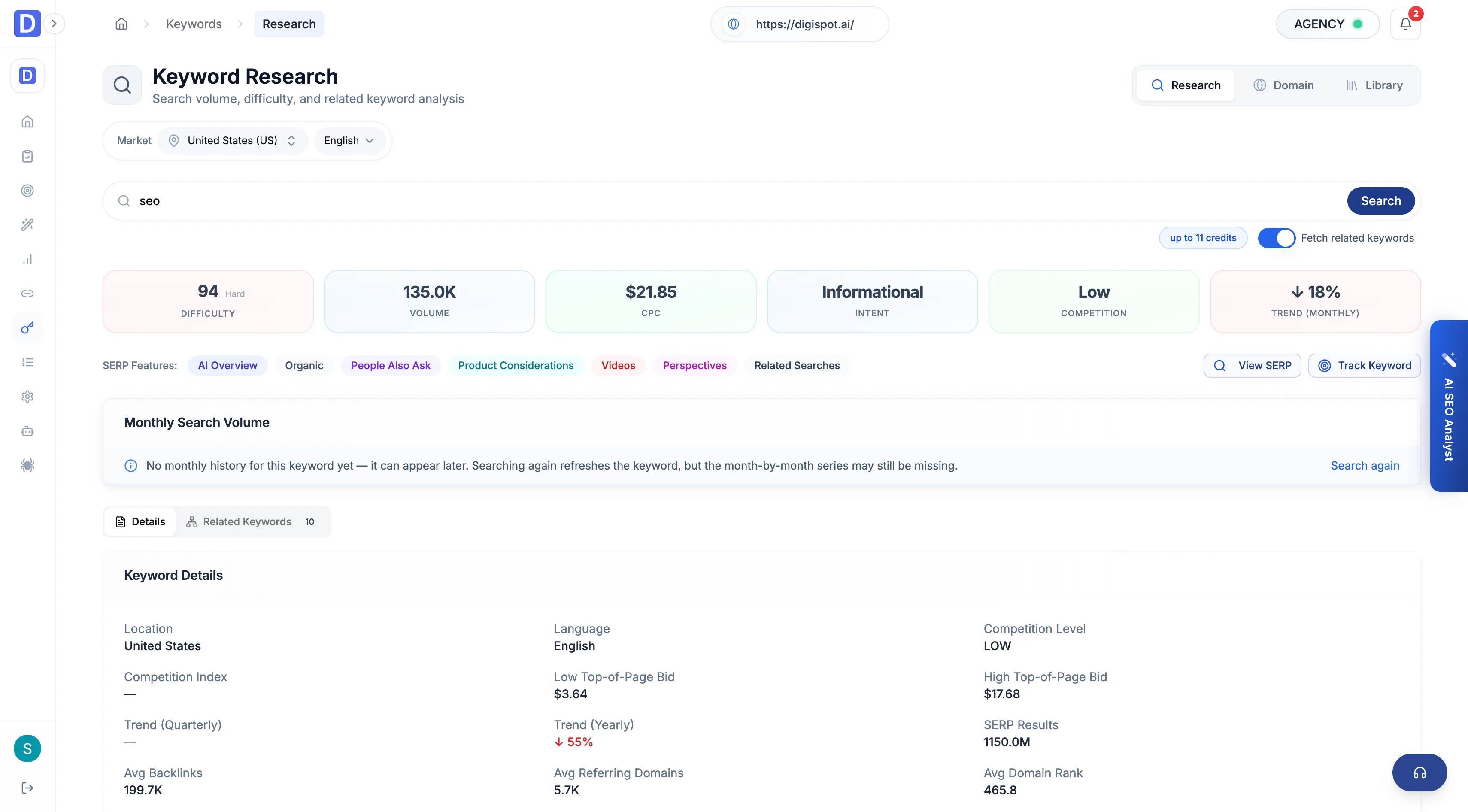
On the Research tab, enter a term, set its location and language, and toggle related keywords on or off before you click search. The result opens with the term's core metrics and a 12-month volume trend.
- Search volume — monthly searches, with month-over-month, quarter, and year trend deltas
- Keyword difficulty — a 0–100 score, banded for quick reading
- CPC and top-of-page bids — the low and high Google Ads bid range
- Search intent — a primary label (informational, navigational, commercial, transactional) plus any secondary intents
- Competition — level (low / medium / high) and the raw competition index
- SERP features — which result types appear for the term (featured snippet, People Also Ask, video, local pack, AI Overview, and others)
- Ranking-page averages — mean backlinks, referring domains, and domain rank across the current top 10
Difficulty is banded so a number reads at a glance:
| Band | Score |
|---|---|
| Easy | 0–29 |
| Possible | 30–49 |
| Difficult | 50–69 |
| Hard | 70–100 |
Related-keyword graph
With related keywords enabled, the seed term anchors a force-directed graph of up to 10 connected keywords. Click any node to re-research it — each drill-down adds to a breadcrumb trail (up to five deep) so you can walk back without re-spending. Filter the graph by intent, difficulty range, and CPC range, and the related-keyword table flags opportunities where difficulty is 30 or below and volume is 500 or above.
Domain — a competitor's keywords
On the Domain tab, enter a competitor's domain with a location and language to pull the keywords that domain already ranks for — the terms a site should target but may not yet. Results are paginated and carry the same per-keyword metrics as Research, plus word count and referring-domain and backlink counts per term. A domain pull costs 1 credit plus up to 11 for the keywords returned.
Library — what you've unlocked
The Library tab collects every keyword you look up, and its label shows the running count. Sort by volume, difficulty, CPC, or unlock date, and search by text. Reopening a saved keyword in Research restores it from cache at no cost. Keywords with no volume, difficulty, or CPC are flagged so a niche or mistyped term is obvious.
Credits and plan limits
Related keywords, the domain pull, and batch lookups are gated by plan.
| Action | Cost | Plan |
|---|---|---|
| Single keyword lookup | 1 Data credit | Free and up |
| + related keywords | up to 10 more | Starter and up |
| Domain keyword pull | 1 + up to 11 | Starter and up |
| Reopening a Library keyword | Free | Free and up |
Research
Keyword, SERP, and backlink research in the cloud — powered by Data credits, with a saved library for what you look up.
SERP research
Capture a live Google results page for any query, track how the project's keywords rank over time, and see every query the domain ranks for — with device, language, and depth control.